Classifying file content to file extension with PyTorch

The goal

  • The goal is to create a model with PyTorch that takes the content of a file as input and classifies and determines which extension the file probably has.

This is possible with Logistic Regression.

Step 1: Gathering files

  • I couldn’t find a place on the WWW that offers a large number of files of each type (e.g. 100 EXE files, 100 ZIP files, …). That’s why I wrote a Python script that searches my hard drive for files.
1
2
3
4
5
6
7
8
9
10
11
12
13
14
15
16
17
18
19
20
21
22
23
24
25
26
27
28
29
30
31
32
33
34
35
36
37
import os
import glob
import json

path = "C:\\"

file_extensions = ["pdf", "png", "jpg", "htm", "txt", "mp3", "exe", "zip", "gif", "xml", "json", "cs"]

def get_all_files(directory, extension):
files = []
result_bytes = []

for dirpath, _, filenames in os.walk(directory):
# Use glob.glob() to filter out files in the current directory
for filename in filenames:
if(filename.endswith(extension)):
file = os.path.join(dirpath, filename)
files.append(file)
try:
size = os.stat(file).st_size
if size >= 100:
with open(file, "rb") as f:
bytes = f.read(100)
result_bytes.append([x for x in bytes])
if len(result_bytes) >= 500:
return result_bytes
except:
print("An exception occurred")

print("no more with extension ", extension)
return result_bytes


for ext in file_extensions:
result_bytes = get_all_files(path, "." + ext)
with open('output_bytes-' + ext + '.txt', 'w') as filehandle:
json.dump(result_bytes, filehandle)
  • We iterate over all possible extensions we care about and try to find 500 files of each. Of each of the files, we take only the first 100 bytes. This should be enough, because the header information of the file, that usually make it possible to identify its type/extension, are usually located at the beginning of the file.
    • Example: A PNG file begins starts with the following 8 bytes: 137 80 78 71 13 10 26 10
  • After that, we create a JSON file for each extension and store the bytes in it.

The generated files

  • This is how the file output_bytes-exe.txt looks like:
1
2
3
4
5
6
7
[
[2, 0, 0, 0, 0, 0, 0, 0, 152, 35, 122, 14, 0, 0, 0, 0, 0, 13, 121, 151, 185, 96, 218, 1, 42, 0, 0, 0, 67, 0, 58, 0, 92, 0, 85, 0, 115, 0, 101, 0, 114, 0, 115, 0, 92, 0, 108, 0, 117, 0, 101, 0, 98, 0, 101, 0, 99, 0, 107, 0, 92, 0, 68, 0, 111, 0, 119, 0, 110, 0, 108, 0, 111, 0, 97, 0, 100, 0, 115, 0, 92, 0, 100, 0, 111, 0, 116, 0, 110, 0, 101, 0, 116, 0, 102, 0, 120, 0, 51, 0],
[2, 0, 0, 0, 0, 0, 0, 0, 160, 77, 81, 2, 0, 0, 0, 0, 96, 247, 121, 151, 185, 96, 218, 1, 68, 0, 0, 0, 67, 0, 58, 0, 92, 0, 85, 0, 115, 0, 101, 0, 114, 0, 115, 0, 92, 0, 108, 0, 117, 0, 101, 0, 98, 0, 101, 0, 99, 0, 107, 0, 92, 0, 68, 0, 111, 0, 119, 0, 110, 0, 108, 0, 111, 0, 97, 0, 100, 0, 115, 0, 92, 0, 73, 0, 109, 0, 97, 0, 103, 0, 101, 0, 77, 0, 97, 0, 103, 0, 105, 0],
[2, 0, 0, 0, 0, 0, 0, 0, 208, 93, 119, 1, 0, 0, 0, 0, 128, 39, 127, 151, 185, 96, 218, 1, 54, 0, 0, 0, 67, 0, 58, 0, 92, 0, 85, 0, 115, 0, 101, 0, 114, 0, 115, 0, 92, 0, 108, 0, 117, 0, 101, 0, 98, 0, 101, 0, 99, 0, 107, 0, 92, 0, 68, 0, 111, 0, 119, 0, 110, 0, 108, 0, 111, 0, 97, 0, 100, 0, 115, 0, 92, 0, 83, 0, 111, 0, 117, 0, 114, 0, 99, 0, 101, 0, 84, 0, 114, 0, 101, 0],
[2, 0, 0, 0, 0, 0, 0, 0, 136, 191, 118, 2, 0, 0, 0, 0, 16, 165, 123, 151, 185, 96, 218, 1, 64, 0, 0, 0, 67, 0, 58, 0, 92, 0, 85, 0, 115, 0, 101, 0, 114, 0, 115, 0, 92, 0, 108, 0, 117, 0, 101, 0, 98, 0, 101, 0, 99, 0, 107, 0, 92, 0, 68, 0, 111, 0, 119, 0, 110, 0, 108, 0, 111, 0, 97, 0, 100, 0, 115, 0, 92, 0, 74, 0, 101, 0, 116, 0, 66, 0, 114, 0, 97, 0, 105, 0, 110, 0, 115, 0],
...
]
  • This is how the file output_bytes-gif.txt looks like (it contains a few duplicates):
1
2
3
4
5
6
7
[
[71, 73, 70, 56, 57, 97, 32, 0, 32, 0, 145, 255, 0, 255, 255, 255, 153, 153, 153, 0, 0, 0, 192, 192, 192, 33, 249, 4, 1, 0, 0, 3, 0, 44, 0, 0, 0, 0, 32, 0, 32, 0, 0, 2, 106, 156, 63, 160, 139, 237, 111, 148, 152, 84, 193, 139, 0, 221, 21, 95, 93, 45, 27, 224, 57, 160, 96, 29, 210, 68, 150, 17, 215, 102, 157, 11, 158, 177, 202, 210, 225, 140, 231, 94, 253, 242, 245, 110, 16, 96, 16, 37, 67, 254, 132, 9, 158, 17, 243, 60],
[71, 73, 70, 56, 57, 97, 31, 0, 32, 0, 145, 255, 0, 255, 255, 255, 0, 0, 0, 192, 192, 192, 0, 0, 0, 33, 249, 4, 1, 0, 0, 2, 0, 44, 0, 0, 0, 0, 31, 0, 32, 0, 0, 2, 118, 76, 132, 169, 203, 45, 1, 142, 155, 20, 70, 138, 153, 189, 185, 111, 222, 85, 192, 56, 74, 161, 243, 149, 39, 74, 182, 230, 154, 164, 228, 11, 203, 51, 28, 183, 165, 97, 224, 207, 172, 242, 229, 34, 22, 26, 14, 34, 41, 10, 17, 61, 102, 80, 72, 83],
[71, 73, 70, 56, 57, 97, 32, 0, 32, 0, 145, 255, 0, 255, 255, 255, 153, 153, 153, 0, 0, 0, 192, 192, 192, 33, 249, 4, 1, 0, 0, 3, 0, 44, 0, 0, 0, 0, 32, 0, 32, 0, 0, 2, 106, 156, 63, 160, 139, 237, 111, 148, 152, 84, 193, 139, 0, 221, 21, 95, 93, 45, 27, 224, 57, 160, 96, 29, 210, 68, 150, 17, 215, 102, 157, 11, 158, 177, 202, 210, 225, 140, 231, 94, 253, 242, 245, 110, 16, 96, 16, 37, 67, 254, 132, 9, 158, 17, 243, 60],
[71, 73, 70, 56, 57, 97, 31, 0, 32, 0, 145, 255, 0, 255, 255, 255, 0, 0, 0, 192, 192, 192, 0, 0, 0, 33, 249, 4, 1, 0, 0, 2, 0, 44, 0, 0, 0, 0, 31, 0, 32, 0, 0, 2, 121, 76, 132, 169, 203, 45, 1, 142, 155, 20, 70, 138, 153, 189, 185, 111, 222, 85, 192, 56, 74, 161, 243, 149, 39, 74, 182, 230, 154, 164, 228, 11, 203, 51, 28, 183, 165, 97, 224, 207, 172, 242, 229, 34, 22, 26, 14, 34, 41, 10, 17, 61, 102, 80, 72, 83],
...
]

Step 2: Creating a model

Imports

1
2
3
4
5
6
7
8
9
import numpy as np
import torch
import random
import json

import torch.nn as nn
from torch.utils.data import TensorDataset
from torch.utils.data import DataLoader
import torch.nn.functional as F

Constants

  • These constants will be used later.
  • The input_size will decide, how many of the first 100 bytes we will use to train the model. We’ll use only the first 25 bytes.
1
2
file_extensions = ["pdf", "png", "jpg", "htm", "txt", "mp3", "exe", "zip", "gif", "xml", "json", "cs"]
input_size = 25

A helper function

  • This is a helper function that generates an accuracy.
    • That value is not needed by the model, but allows us to know how many of the predictions were correct.
1
2
3
4
5
def accuracy(outputs, labels):
_, preds_max_indices = torch.max(outputs, dim=1)
_, labels_max_indices = torch.max(labels, dim=1)
matches = torch.sum(preds_max_indices == labels_max_indices).item()
return torch.tensor(matches / len(labels))

The model itself

  • We create a model with 4 layers. The first layer has 25 inputs for the 25 first bytes of the file. The 2nd layer has also 25 inputs. The next 2 layers each have 16 inputs.
  • The number of outputs of the last layer is the number of possible file extensions we consider.
  • The model uses the accuracy function from above to provide us additional information during the training.
  • We are using cross entropy for the loss calculation and softmax to get numbers that sum up to 1 in the end.
1
2
3
4
5
6
7
8
9
10
11
12
13
14
15
16
17
18
19
20
21
22
23
24
25
26
27
28
29
30
31
32
33
34
35
36
37
38
39
40
41
class FileClassifierModel(nn.Module):
def __init__(self):
super().__init__()
inputs_on_inner_layer_1 = 25
inputs_on_inner_layer_2 = 16
inputs_on_inner_layer_3 = 16
self.linear1 = nn.Linear(input_size, inputs_on_inner_layer_1)
self.linear2 = nn.Linear(inputs_on_inner_layer_1, inputs_on_inner_layer_2)
self.linear3 = nn.Linear(inputs_on_inner_layer_2, inputs_on_inner_layer_3)
self.linear4 = nn.Linear(inputs_on_inner_layer_3, len(file_extensions))

def forward(self, xb):
out = self.linear1(xb)
out = self.linear2(out)
out = self.linear3(out)
out = F.log_softmax(self.linear4(out), dim=-1)
return out

def training_step(self, batch):
feature, labels = batch
out = self(feature) # Generate predictions
loss = F.cross_entropy(out, labels) # Calculate loss
return loss

def validation_step(self, batch):
feature, labels = batch
out = self(feature) # Generate predictions
loss = F.cross_entropy(out, labels) # Calculate loss
acc = accuracy(out, labels) # Calculate accuracy
return {'val_loss': loss, 'val_acc': acc}

def validation_epoch_end(self, outputs):
batch_losses = [x['val_loss'] for x in outputs]
epoch_loss = torch.stack(batch_losses).mean() # Combine losses
epoch_accs = [x['val_acc'] for x in outputs]
epoch_acc = torch.stack(epoch_accs).mean()
return {'val_loss': epoch_loss.item(), 'val_acc': epoch_acc.item()}

def epoch_end(self, epoch, result):
if (epoch < 50 and epoch % 10 == 0) or epoch % 50 == 0:
print(epoch, result)

Step 3: Loading the data and preparing them for PyTorch

  • We make sure that there are training data and validation data.
  • We need to somehow provide the model expected output (target values). We do this by creating an array of only zeros (a zero for each possible file type) and setting the first number to 1 in case of pdf, the seconds number to 1 in case of png, …
1
2
3
4
5
6
7
8
9
10
11
12
13
14
15
16
17
18
19
20
21
22
23
24
25
26
27
28
29
30
31
32
33
34
35
36
input_array = []
target_array = []

input_evaluation = []
targets_evaluation = []

print("loading data")

for i in range(len(file_extensions)):
with open('output_bytes-' + file_extensions[i] + '.txt', 'r') as filehandle:
imported_byte_arrays = json.load(filehandle)
for j in range(len(imported_byte_arrays)):
target = [0 for _ in range(len(file_extensions))]
target[i] = 1
if j < len(imported_byte_arrays) // 2:
input_array.append(imported_byte_arrays[j][:input_size])
target_array.append(target)
else:
input_evaluation.append(imported_byte_arrays[j][:input_size])
targets_evaluation.append(target)


inputs = torch.from_numpy(np.array(input_array, dtype='float32'))
targets = torch.from_numpy(np.array(target_array, dtype='float32'))
inputs_evaluation = torch.from_numpy(np.array(input_evaluation, dtype='float32'))
targets_evaluation = torch.from_numpy(np.array(targets_evaluation, dtype='float32'))

train_ds = TensorDataset(inputs, targets)
val_ds = TensorDataset(inputs_evaluation, targets_evaluation)
batch_size = 32
#train_dl = DataLoader(train_ds, batch_size, shuffle=True)

train_loader = DataLoader(train_ds, batch_size, shuffle=True)
val_loader = DataLoader(val_ds, batch_size, shuffle=True)

print("loaded data")

Step 4: Helper functions to train

1
2
3
4
5
6
7
8
9
10
11
12
13
14
15
16
17
18
def evaluate(model, val_loader):
outputs = [model.validation_step(batch) for batch in val_loader]
return model.validation_epoch_end(outputs)

def fit(epochs, lr, model, train_loader, val_loader, opt_func=torch.optim.SGD):
optimizer = opt_func(model.parameters(), lr)

for epoch in range(epochs):
# Training Phase
for batch in train_loader:
loss = model.training_step(batch)
loss.backward()
optimizer.step()
optimizer.zero_grad()

# Validation phase
result = evaluate(model, val_loader)
model.epoch_end(epoch, result)
  • Passing the evaluation result to epoch_end, where we print it…

Step 5: Training

execution

1
2
3
4
model = FileClassifierModel()

fit(1000 + 1, 0.00001, model, train_loader, val_loader)
print("training completed")

The output

1
2
3
4
5
6
7
8
9
10
11
12
13
14
15
16
17
18
19
20
21
22
23
24
25
0 {'val_loss': 8.624412536621094, 'val_acc': 0.10610464960336685}
10 {'val_loss': 4.0071821212768555, 'val_acc': 0.14498546719551086}
20 {'val_loss': 2.8095500469207764, 'val_acc': 0.27374032139778137}
30 {'val_loss': 2.33066725730896, 'val_acc': 0.40588662028312683}
40 {'val_loss': 2.0081698894500732, 'val_acc': 0.6006540656089783}
50 {'val_loss': 1.7724593877792358, 'val_acc': 0.6253633499145508}
100 {'val_loss': 1.2589199542999268, 'val_acc': 0.7555716633796692}
150 {'val_loss': 1.0362776517868042, 'val_acc': 0.785973846912384}
200 {'val_loss': 0.8881730437278748, 'val_acc': 0.7965116500854492}
250 {'val_loss': 0.7964695692062378, 'val_acc': 0.8143168687820435}
300 {'val_loss': 0.7093650102615356, 'val_acc': 0.8194040656089783}
350 {'val_loss': 0.6533689498901367, 'val_acc': 0.8263081312179565}
400 {'val_loss': 0.6087998747825623, 'val_acc': 0.827882707118988}
450 {'val_loss': 0.5706676840782166, 'val_acc': 0.827882707118988}
500 {'val_loss': 0.5289875268936157, 'val_acc': 0.8361191749572754}
550 {'val_loss': 0.5028802156448364, 'val_acc': 0.8768168687820435}
600 {'val_loss': 0.4818893373012543, 'val_acc': 0.8786337375640869}
650 {'val_loss': 0.46161961555480957, 'val_acc': 0.8837209343910217}
700 {'val_loss': 0.4528854787349701, 'val_acc': 0.8840842843055725}
750 {'val_loss': 0.43776267766952515, 'val_acc': 0.885901153087616}
800 {'val_loss': 0.4428856372833252, 'val_acc': 0.8781492710113525}
850 {'val_loss': 0.42053550481796265, 'val_acc': 0.8866279125213623}
900 {'val_loss': 0.42180967330932617, 'val_acc': 0.8842054009437561}
950 {'val_loss': 0.4081422686576843, 'val_acc': 0.8891715407371521}
1000 {'val_loss': 0.393417626619339, 'val_acc': 0.8917151093482971}
  • We can see, that the achieved accuracy (how many files are classified correctly) of our evaluation data is around 90%.

Step 6: Evaluation with files from the WWW

  • Let’s try out the model with a few files from the WWW…
1
2
3
4
5
6
7
8
9
10
11
12
13
14
15
16
17
18
19
20
21
22
23
24
25
26
27
28
29
30
31
32
33
34
35
import urllib

def softmax(x):
"""Compute softmax values for each sets of scores in x."""
e_x = np.exp(x - np.max(x))
return e_x / e_x.sum(axis=0) # only difference

def get_first_n_file_bytes(file, n):
with open(file, "rb") as f:
bytes = f.read(n)
return [x for x in bytes]

def find_out_file_type(url, filename):
opener = urllib.request.URLopener()
opener.addheader('User-Agent', 'Mozilla/5.0 (Windows NT 10.0; Win64; x64; rv:109.0) Gecko/20100101 Firefox/116.0')
filename, headers = opener.retrieve(url, filename)

first_n_bytes = get_first_n_file_bytes(filename, input_size)
input_bytes = torch.from_numpy(np.array(first_n_bytes, dtype='float32'))
prediction = model(input_bytes).detach().numpy()

result = list(zip(file_extensions, softmax(prediction)))
result.sort(key=lambda x:x[1], reverse=True)
print()
print(filename)
print("File type predictions:", result)
print("Max:", max(result, key=lambda x:int(x[1])))

find_out_file_type("https://examplefiles.org/files/documents/pdf-example-file-download.pdf", "pdf")
find_out_file_type("https://examplefiles.org/files/images/gif-example-file-download-500x500.gif", "gif")
find_out_file_type("https://examplefiles.org/files/images/jpg-example-file-download-500x500.jpg", "jpg")
find_out_file_type("https://examplefiles.org/files/code/csharp-example-file-download.cs", "cs")
find_out_file_type("https://download.samplelib.com/mp3/sample-3s.mp3", "mp3")
find_out_file_type("https://joplinapp.org", "htm")
find_out_file_type("https://thetestdata.com/samplefiles/zip/Thetestdata_ZIP_10KB.zip", "zip")

Output

1
2
3
4
5
6
7
8
9
10
11
12
13
14
15
16
17
18
19
20
21
22
23
24
25
26
27
28
29

pdf
File type predictions: [('pdf', 0.99957293), ('png', 0.0003889691), ('htm', 1.3338788e-05), ('txt', 1.2008419e-05), ('cs', 6.656816e-06), ('zip', 5.782582e-06), ('xml', 2.0367077e-07), ('exe', 5.9544313e-08), ('json', 1.3750326e-08), ('jpg', 8.360316e-09), ('mp3', 4.1576276e-10), ('gif', 3.8710946e-10)]
Max: ('pdf', 0.99957293)

gif
File type predictions: [('gif', 0.9924313), ('xml', 0.004647503), ('htm', 0.0026793152), ('txt', 0.0002418101), ('json', 1.7337274e-07), ('pdf', 3.674831e-08), ('jpg', 3.6080159e-09), ('cs', 3.0783262e-10), ('zip', 9.601929e-12), ('exe', 6.243739e-14), ('png', 2.5869204e-14), ('mp3', 2.2233753e-18)]
Max: ('gif', 0.9924313)

jpg
File type predictions: [('jpg', 0.9983871), ('mp3', 0.0015315404), ('exe', 6.748972e-05), ('cs', 1.32957375e-05), ('xml', 3.2621207e-07), ('png', 1.5813973e-07), ('txt', 6.929081e-08), ('htm', 2.6274906e-08), ('pdf', 6.452537e-10), ('json', 2.412057e-10), ('zip', 4.7582445e-11), ('gif', 3.2610108e-14)]
Max: ('jpg', 0.9983871)

cs
File type predictions: [('txt', 0.6823746), ('htm', 0.30781534), ('cs', 0.0051552956), ('json', 0.0041454593), ('pdf', 0.00024531735), ('gif', 0.00013455634), ('xml', 0.00010763234), ('png', 1.4811907e-05), ('jpg', 6.845297e-06), ('exe', 8.2238635e-08), ('zip', 6.2328084e-08), ('mp3', 5.4067383e-11)]
Max: ('txt', 0.6823746)

mp3
File type predictions: [('mp3', 0.80809027), ('zip', 0.0879088), ('png', 0.037701253), ('pdf', 0.03573006), ('xml', 0.0130449375), ('exe', 0.012635396), ('cs', 0.003068516), ('jpg', 0.0013210746), ('txt', 0.0002153362), ('json', 0.00015221033), ('htm', 0.000100272526), ('gif', 3.186537e-05)]
Max: ('mp3', 0.80809027)

htm
File type predictions: [('htm', 0.8034207), ('txt', 0.141119), ('gif', 0.026775876), ('json', 0.018376078), ('xml', 0.0050214273), ('pdf', 0.00456642), ('cs', 0.0007195702), ('jpg', 4.9311626e-07), ('zip', 3.5242434e-07), ('png', 1.685475e-07), ('exe', 3.1411551e-09), ('mp3', 2.361252e-13)]
Max: ('htm', 0.8034207)

zip
File type predictions: [('zip', 0.4791556), ('png', 0.38491032), ('pdf', 0.13590351), ('cs', 2.1206082e-05), ('json', 5.924706e-06), ('exe', 2.8793702e-06), ('htm', 2.54819e-07), ('txt', 1.5399058e-07), ('xml', 1.5081281e-07), ('mp3', 6.409486e-09), ('gif', 5.414454e-09), ('jpg', 1.7928892e-13)]
Max: ('zip', 0.4791556)

Analysis

(Mis)classification matrix

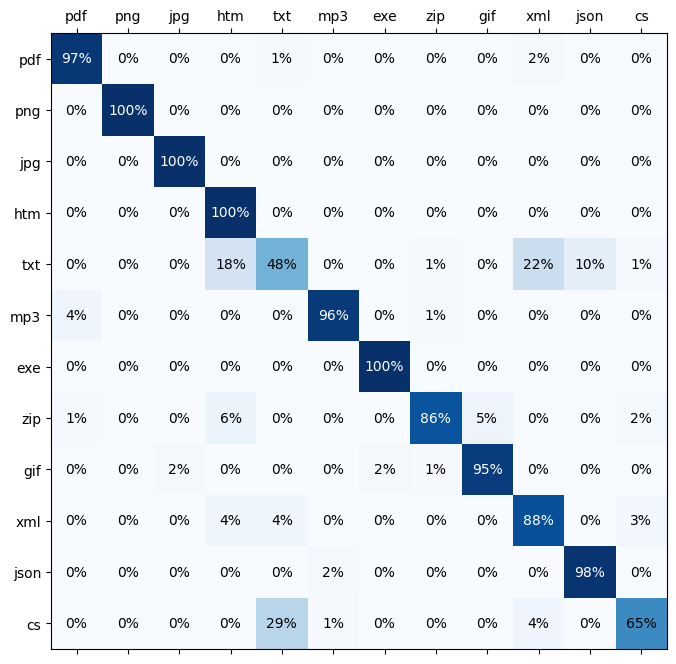
  • Let’s generate a matrix that tells us how each of the byte inputs is classified…
1
2
3
4
5
6
7
8
9
10
11
12
13
14
15
16
17
18
19
20
21
22
23
24
25
26
27
28
29
30
31
32
33
34
35
36
37
38
39
40
41
42
43
import numpy as np
import matplotlib.pyplot as plt

def generate_classification_matrix():
matrix = [[0 for _ in range(len(file_extensions))] for _ in range(len(file_extensions))]
loader = DataLoader(val_ds)
for pair in loader:
#for e in batch:
feature = pair[0]
label = pair[1]
pred = model(feature)
_, predicted_index = torch.max(pred, dim=1)
_, actual_index = torch.max(label, dim=1)
#print(predicted_index.item(), actual_index.item())
matrix[actual_index.item()][predicted_index.item()] += 1
return matrix

def matrix_to_percentage_matrix(matrix):
for i in range(len(file_extensions)):
max_val = sum(matrix[i])
for j in range(len(file_extensions)):
matrix[i][j] = round(matrix[i][j] * 100 / max_val)
return matrix

matrix = matrix_to_percentage_matrix(generate_classification_matrix())

fig, ax = plt.subplots(figsize=(16,8))

min_val, max_val = 0, 250

intersection_matrix = np.array(matrix)

ax.matshow(intersection_matrix, cmap=plt.cm.Blues)
ax.set_xticklabels([" "] + file_extensions)
ax.xaxis.set_major_locator(plt.MultipleLocator(1))
ax.set_yticklabels([" "] + file_extensions)
ax.yaxis.set_major_locator(plt.MultipleLocator(1))

for i in range(len(file_extensions)):
for j in range(len(file_extensions)):
c = intersection_matrix[j,i]
font_color = "white" if c > 75 else "black"
ax.text(i, j, str(c) + '%', va='center', ha='center', color=font_color)
  • Explanation
    • The value on the left stands for the correct/actual extension.
    • The value at the top stands for the prediction of the model.
    • first line: From all pdf files, 97% were classified as PDF, 1% as TXT and 2% as XML.
misclassification of dll and exe

  • We can see that the major misclassified extensions are CS (as TXT) and TXT (as XML or HTM).

exe and dll

  • Whether the input file is an exe file or a dll file: The model tends to predict either DLL or EXE with each around 0.5 (50%) probability. It seems that the exe and dll files from my hard drive do not seem to be easily distinguishable.
  • In this figure, we can see a misclassification that can be reliably observed when EXE and DLL are both involved:
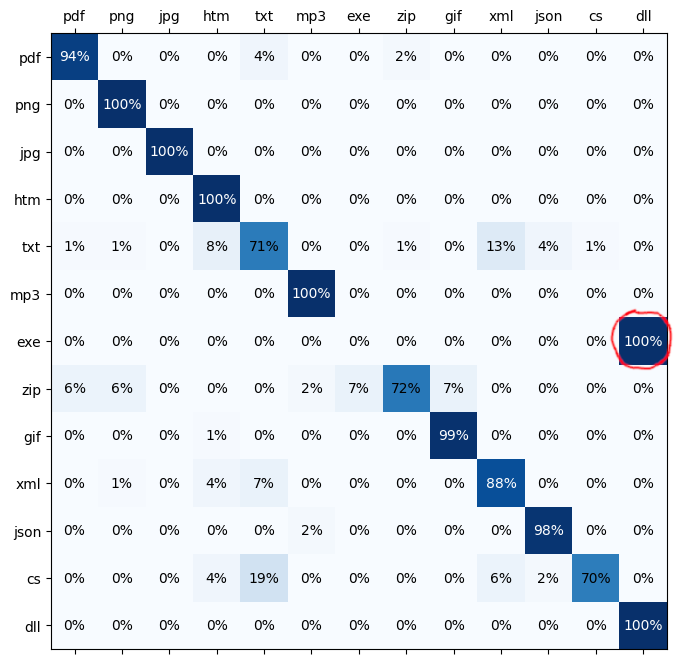
    misclassification of dll and exe

cs

  • CS files are C# source code files, but the model classifies some of them as TXT. Why is that?
    • We consider only the first 25 bytes of the file.
    • The cs file from the web started with namespace HelloWorld and does not contain any using directives at the beginning.
      • But the training files on my hard drive usually contain lots of usings. Therefore, the model has not had the opportunity to learn other ways a C# file might appear (e.g. without usings, with a block scoped namespace, a file scoped namespace, a comment block, many line breaks, …)

Mentionable

Mistake

  • Making mistakes is sometimes useful. Instead of passing the bytes 0 - 24 to the model for training, I once passed the bytes 75 - 99 to it (the last 25 of the 100 first bytes, not the first 25), because of a mistake in the Python syntax.
    • The loss value stayed pretty high and of course, that makes sense, especially for many binary files, because the most relevant header information bytes that indicate the file type are usually placed right at the beginning of a file.

Input size

  • I started with an input size of 100 bytes, but it turned out that the first 25 bytes were (on average, this is maybe not true for a cs file, see above) considerably more important than the bytes 25 - 99.
    • Decreasing the input size to 25 bytes made the training much faster.

Further improvements

  • The result can be further improved by:
    • using more training data
    • using more diverse training data
    • eliminating duplicated training files
    • considering more than just the first 25 bytes
    • using more advanced machine learning techniques
  • Google developed a tool called magika, which seems to be a lot better, but they have probably used more training data from people who are unaware of it. 😉